SimpMusic Wear OS is our standalone YouTube Music client for the watch. Find a song from your wrist and play it through the watch's audio output. The project is free and open source.
Install SimpMusic on your watch to try it. The installer separates the watch APK from the optional Android companion and includes an update path for existing users.

SimpMusic on Galaxy Watch4 Classic, beta.1 (41), captured before final signing. The beta.2 release kept this watch interface.
Choose a song on the watch
Open Search on watch and enter an artist or title with the watch keyboard. You can browse results and start a track as a guest, without first adding a Google account. The search guide covers the input and result controls.
Once a track is playing, tap its title to open the queue. Add another song with Play next when you want it after the current track. The player drawer has queue ordering, shuffle and repeat controls, with seeking available for tracks whose duration is known.
On watches that provide rotary input, the normal player can use the bezel or crown for media volume. The watch remains the playback device. Streaming needs internet access; completed watch downloads provide the route for listening away from a connection.
Get a queue ready before leaving
For a run or commute, arrange the songs you want and choose Keep queue offline. Wait for those tracks to finish in the Offline queue card in Downloads, then use Play offline queue.
The default download policy waits for unmetered connectivity and charging, shown as Wi-Fi + charging. Saving a queue starts the preparation process. Its ready count tells you how much of that saved selection has finished.
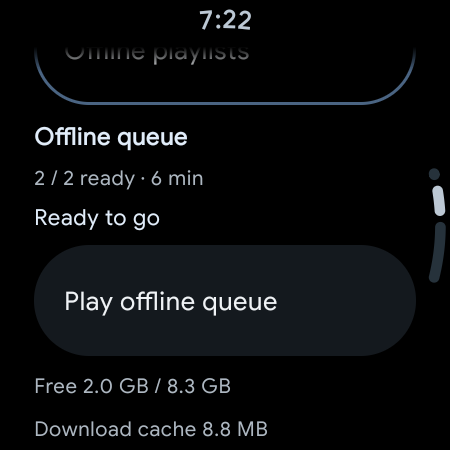
A completed two-track queue on Galaxy Watch4 Classic, beta.1 (41), captured before final signing. The ready count belongs to this saved queue.
Use the offline preparation guide to check playback through your intended watch output before leaving. If the downloads wait, check their network and charging requirements.
For collections you want to refresh over time, SimpMusic also has kept-offline playlists. Refresh and cleanup are experimental; a saved queue is the simpler starting point for one outing.
Add the companion when you want phone controls
The optional Android companion follows the watch player and queue. It gives you phone controls and a larger screen for the provided sign-in flow, then can send that session to the watch.
You can try guest search and playback before adding it. When you want the companion, put that APK on your paired Android phone and keep the watch APK on the watch. The watch-and-companion guide explains the roles and account transfer.
The public companion controls watch playback. It does not turn this release into a full phone music player or copy an MP3 library to the watch.
A watch app built from an open-source project
Rahyan maintains SimpMusic Wear OS and its companion, based on SimpMusic by maxrave-dev and contributors. The released source is available under GPL-3.0.
The project is an unofficial YouTube Music client, independent of Google. Song availability and playback can change with YouTube's service. Installing the app does not include a Premium subscription.
Read why I built SimpMusic for Wear OS for the personal story, or the app privacy notice before adding an account.
Try the public beta
The public release is v0.3.0-beta.2. It is sideloaded, with one watch APK to install and an optional Android companion. The universal watch APK includes ARMv7 and ARM64 variants; the guided installer helps you choose the right device and download.
If you are still deciding how to listen, the broader YouTube Music on Wear OS guide covers SimpMusic alongside the official app. To start with SimpMusic, install the watch app, find a familiar song and check the watch's audio output.

Discussion
0 comments. Share feedback or ask a question.
Sign in to comment.
No comments yet.