You can search for a song and play it directly on a Wear OS watch with SimpMusic Wear OS, our free, open-source YouTube Music client. The watch handles the audio. An optional Android companion adds sign-in and controls for that watch player.
The official YouTube Music app is also available through the watch’s Play Store. Whichever route you choose, streaming needs an internet connection. For a run without your phone or coverage, finish downloading the music onto the watch before leaving.
Start with SimpMusic
SimpMusic lets you browse and play as a guest. You can search on the watch, open an album or playlist, change the queue and save music for later. It is an unofficial client in beta; song availability and playback can change with YouTube’s service.
- Install one watch APK. Choose ARM universal if you are unsure which of the three watch files to use.
- Open SimpMusic on the watch and choose Search on watch.
- Enter a song or artist using the watch’s keyboard, then submit the query. Open a result and start playback.
- Check the watch’s media volume and audio output. The phone companion does not play the song through your phone.
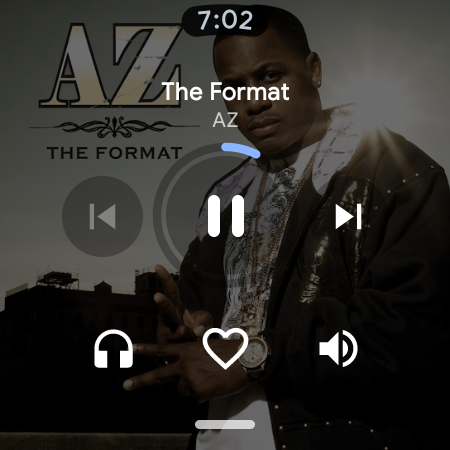
The player on a Galaxy Watch4 Classic, captured on beta.1. Beta.2 changes companion connection timing, rather than this watch interface.
For the complete input and result controls, follow searching for YouTube Music on the watch. Dictation, when available, comes from your installed keyboard.
Does the music play on the watch?
Yes. SimpMusic’s watch APK owns playback, its queue and its downloads. The lightweight Android companion can control that playback and transfer a signed-in session. It is not a phone audio player, and you do not need it for a first guest search.
That is different from a watch screen that only controls music still playing on a nearby phone. If leaving the phone makes the music stop, check which device is actually playing and whether the watch has its own connection or completed downloads. Watch APK and companion: which goes where?
Prepare music without carrying the phone
For SimpMusic, build the queue you want, open it and select Keep queue offline. In Downloads, the saved queue has its own ready count. Wait for the tracks you need to finish.
The default policy waits for an unmetered network and charging, shown as Wi-Fi + charging. A queued request is not a finished download. Downloading a song individually also does not create the separate saved queue.
Prepare and check an offline queue before a run. That guide also explains partial queues, storage and experimental playlist sync.
When you want the official YouTube Music app
Open the Play Store on the watch, find YouTube Music and follow its account setup. Google documents direct watch streaming and downloads in its Wear OS music guide. Availability and subscription requirements depend on the feature and region.
Google currently lists non-premium YouTube Music streaming on Pixel Watch in Canada and the US. Some features, including music downloads, require Premium. See Google’s Pixel Watch requirements and the official download rules before choosing a plan.
SimpMusic is an independent project. Installing it does not grant a YouTube Premium subscription or guarantee access to restricted tracks.
Choose your watch’s setup route
- Galaxy Watch setup covers Samsung’s Wear OS family. Older Tizen Galaxy watches cannot install this watch APK.
- Pixel Watch setup keeps the official regional option alongside the SimpMusic instructions.
- OnePlus Watch setup starts with the exact model and Wear OS mode.
- The shared installer includes the reviewed Wear OS model selector and current APKs. A model appearing there is not a claim that every feature has been physically tested on it.
What if you already have MP3 files?
Use a file-transfer route and a local watch player for your own audio collection. SimpMusic’s catalogue downloads are a different workflow; this release does not establish a generic MP3 importer or exporter. Our Galaxy Watch MP3 guide explains Samsung’s transfer controls and watch playback.
Install SimpMusic and try your first song, or read the streaming, subscription and own-file options if you are still choosing a route.

Discussion
0 comments. Share feedback or ask a question.
Sign in to comment.
No comments yet.