A watch face code can be accepted while installation still fails. The code, the Google account, the app listing and the target watch each answer a different question. Work out which stage failed before claiming another code or buying the face again.
This guide concerns Google Play promotions for Wear OS watch faces. Galaxy Store coupons for older Tizen watches, in-app purchases and ordinary Play balance are different products. Follow the instructions attached to the promotion you actually received.
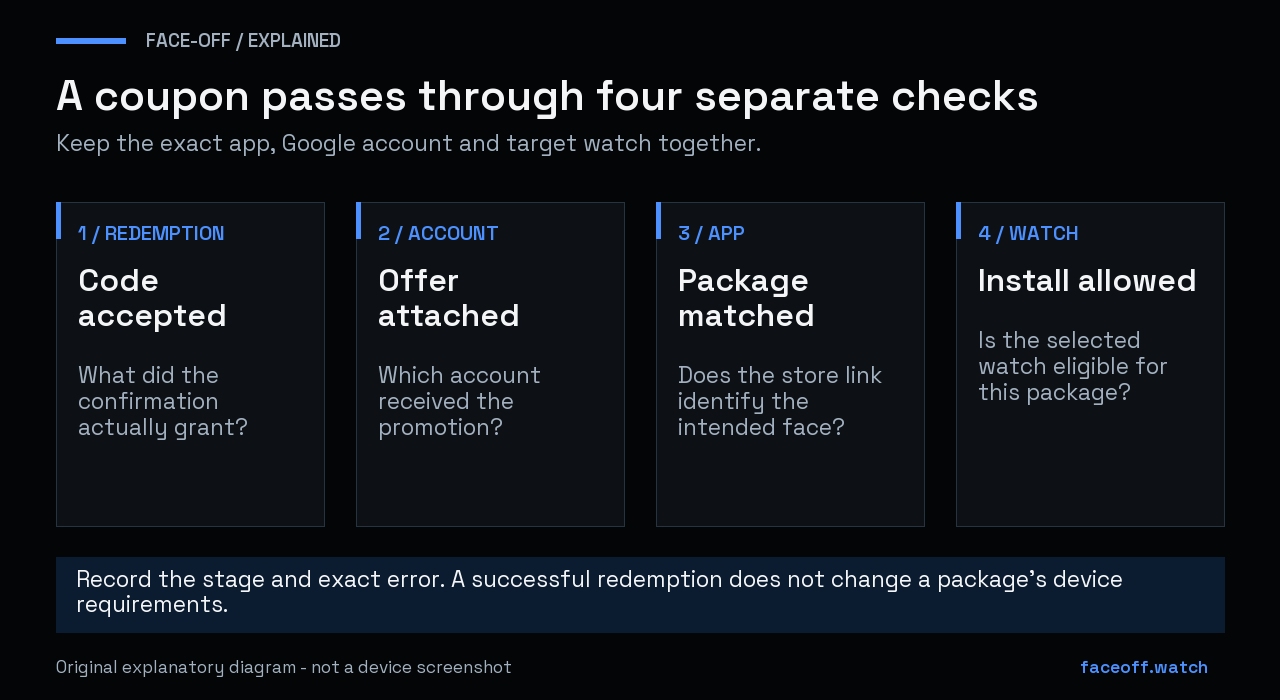
Redemption, account entitlement, package identity and watch eligibility are separate checks. Original explanatory diagram, not a store screenshot.
Match the coupon to the exact watch face
Open the publisher’s store link and compare its title, developer and package identifier with the coupon page. In a Play web address, the app identifier is the value after id=. For example, id=com.example.blueface and id=com.example.redface identify different apps even if their artwork looks related.
Keep a note of the listing you intended to obtain. If a coupon page points to a different face, ask its publisher to correct the association. Do not assume a similar name, another color edition or the same developer makes the code interchangeable. A useful report includes both listing links and the coupon page; it does not need to expose the unused code publicly.
The package check is especially helpful when a giveaway contains several designs. It separates a bad link from a failure on your watch.
Check the account that received the offer
Google Play associates apps and content with a Google account, rather than only with the phone on which you first obtained them. Check the profile shown in Play before redeeming and check the account used for the later installation. Google says content cannot be transferred between accounts. Google’s account and device guidance
For an ordinary Play promotional code, Google documents the redemption control under the profile menu, then Payments & subscriptions and Redeem code. Some app-specific offers instead belong in the item’s checkout flow. Read the offer instructions and the resulting confirmation; acceptance of a code does not always mean that an entire paid app became free. Google Play promotions
If the expected entitlement is missing, inspect the same account first. Re-entering a one-use code on another account does not move it. Keep any confirmation or receipt so the issuer can distinguish successful redemption from an invalid-code report.
Select the watch as the installation target
Open the exact app listing in Google Play. On a phone, the control beside Install can select other devices. On a computer, select Install and choose the watch in the device dropdown. Google’s web interface also indicates whether an item is available for some, all or none of your devices. Install on another device
Check the selected watch name if you own more than one. A phone companion, the wearable package and another watch on the account are separate installation targets. Record which target is rejected; a phone-side message alone is an incomplete compatibility report.
If the browser says that the device has not accessed Play with this account, follow Google’s account-linking troubleshooting. If your watch is already linked and listed, describe that fact when asking for help. Avoid resetting a working watch just to make a coupon screen look different.
Read the failure at the stage where it happens
| Result | Investigate next |
|---|---|
| Code is invalid or expired | The code issuer, offer conditions and expiry |
| Code has already been redeemed | The account that received it and the confirmation |
| Face is unavailable for the selected watch | The app’s current device requirements |
| Install was requested but the face is not selectable | Installation completion, then the watch-face picker |
| Coupon page opens another app | The publisher’s link and package association |
Different errors can occur during the same attempt. Preserve the exact wording and stage instead of shortening all of them to “coupon does not work.”
Redemption does not change the package requirements
A code cannot make an app’s required software appear on a watch. For Wear OS faces, check the released package’s minimum Android API and Watch Face Format version. Google documents a minimum Wear OS version for each WFF version; an editable project also needs to be built into an appropriate package. Watch Face Format requirements
For marketplace faces, check the provider’s current instructions as well. Advice that Facer can never work on newer watches is outdated: Google introduced Watch Face Push for marketplace distribution on Wear OS 6. That does not guarantee that every old design or every feature has the same support. Google’s marketplace announcement
Face-Off’s minimum API and target API guide explains the software checks. The Galaxy Watch APK hub shows requirements recorded for its hosted releases; those records are separate from Play’s eligibility decision.
If the code itself is rejected
Check its spelling, expiry and intended promotion. Google’s code troubleshooting distinguishes invalid, already-used, cancelled and region-related errors. Follow the rule for the type of code shown. Gift-card restrictions should not be silently treated as the terms of every developer giveaway.
If the publisher offered a watch face directly, send them the relevant listing, exact error and your watch/software version. Ask whether the promotion covers that app and device combination. Keep the code private while they investigate. Do not pay again simply to test whether a previously redeemed promotion will eventually apply.
When installation succeeds but the dial is still missing, continue with the full watch-face picker guide. That is the next diagnostic step, rather than another round of coupon redemption.


Discussion
0 comments. Share feedback or ask a question.
Sign in to comment.
No comments yet.