“Android smartwatch” does not identify a watch face platform. A watch can run Wear OS, a more phone-like version of Android, or manufacturer-specific software that uses its own companion app and face files. The same brand can sell watches from different groups.
That distinction explains a common dead end: a watch has Google Play, but a Wear OS pairing app or a downloaded Wear OS face still does not do what you expected. Start with the exact model and software, then identify the face engine. A round display and an .apk extension are not enough to establish compatibility.
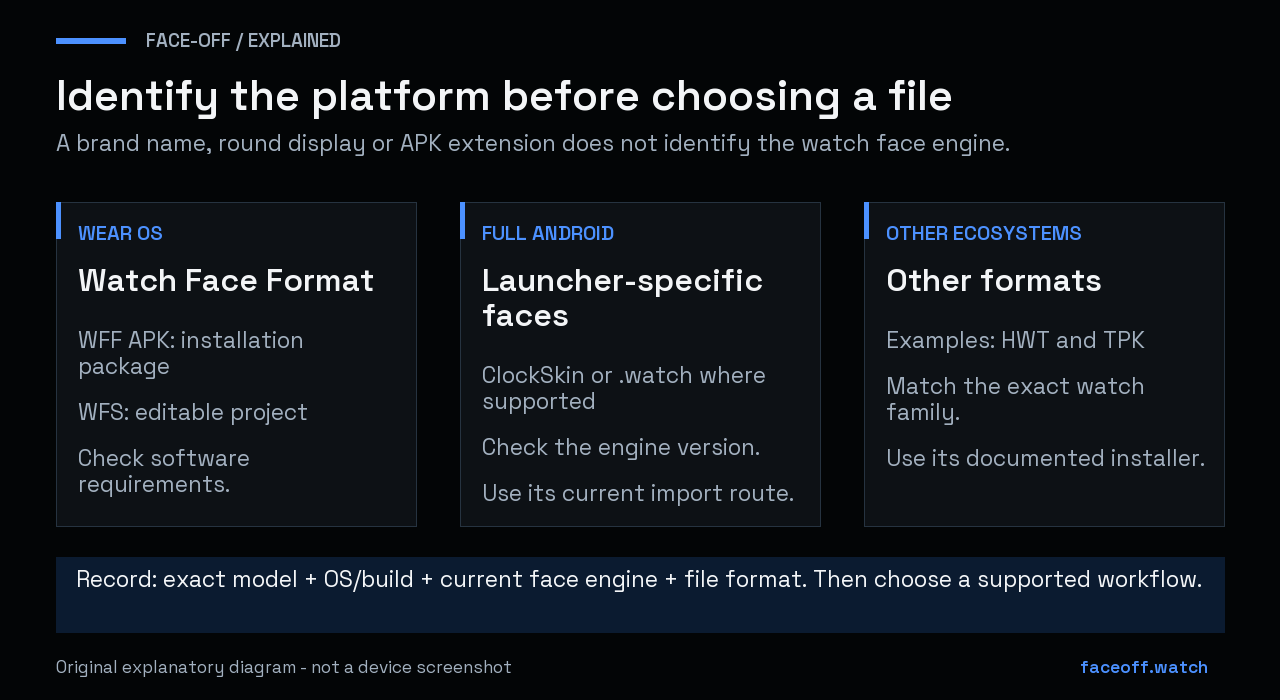
Identify the operating system and face engine before selecting a file. Format support still depends on the exact software. Original explanatory diagram, not a watch capture.
Record the watch before choosing a download
Write down the full model name, Android or operating-system version, and the name of the app you currently use to change its face. Include a model suffix such as Ultra, Pro or SQ. Keep the software build number too if it is available in the device information screen.
Android’s general version-checking instructions use Settings and About phone or About tablet, followed by Android version. Watches can label their equivalent screen differently; use the manufacturer’s instructions where the menus diverge. You do not need to enable developer options to collect a model name or read the published specification. Google’s Android version guidance
When asking for help, a typed model and version are easier to compare than a product photo alone. Leave serial numbers, account addresses and SIM details out of public screenshots.
Wear OS: check the watch-face format and software
Wear OS has a specific watch-face system. Current Watch Face Format designs describe their layout and behavior in XML, with the platform handling rendering. They are packaged for distribution; Google documents APK and Android App Bundle packaging. An App Bundle is a publishing artifact, rather than a file to install by tapping it on a watch. Watch Face Format overview, Android App Bundle overview
Check both the package requirements and the watch’s installed software. A Wear OS model name does not tell you which system update is currently installed. Face-Off’s API requirements guide explains why a minimum API, target API and WFF version answer different questions.
An editable WFS project is also different from the final package. Samsung’s Watch Face Studio is an authoring tool: you edit a project, then build or deploy the result through its workflow. Watch Face Studio documentation
Full Android: the launcher matters
Zeblaze’s published specification lists the Thor Ultra as Android 8.1. Its Thor 6 page lists Android 10. These are different devices and software baselines; neither should be identified from the word Thor alone. Thor Ultra specification, Thor 6 specification
On a full-Android watch, the launcher or installed face engine can determine which custom faces it understands. For example, the Universal Launcher V4.1 author documents support for ClockSkin and WatchMaker formats. That describes the launcher’s capabilities, not a guarantee that every full-Android watch, archive or protected design will work. Universal Launcher release documentation
Look for the engine’s current installation instructions before copying a file. Record its version alongside the Android version. A guide written for a stock launcher several years ago may describe a different storage location or different supported elements.
Use the file extension to ask the next question
| File or project | What to establish before using it |
|---|---|
| WFF resources inside an APK | Does the watch have a compatible Wear OS renderer and software version? |
| WFS project | Which Watch Face Studio version and build workflow does the project need? |
| ClockSkin archive | Which launcher/engine, archive layout and features does it support? |
WatchMaker .watch file |
Which app or engine is intended to read it, and is editing permitted? |
| HWT or TPK from another ecosystem | Is the download actually intended for your watch platform? |
This is a routing table, not a list of interchangeable formats. Renaming a file leaves its internal layout and behavior unchanged. If an archive belongs to another engine, first look for an appropriate release of the design or a documented conversion workflow.
For the source-versus-package distinction, see which watch face file you need. Keep the original file unchanged while investigating it.
A current ClockSkin example: storage changed
Universal Launcher V4.1’s release notes describe a move to app-specific external storage and a bulk-import process for existing faces. They also describe a fullscreen correction that can affect older faces designed around the previous centering behavior. Those are good reasons to check the launcher version before following an old folder-copy tutorial. They are not instructions to delete an existing library. Storage and fullscreen changes
Save an unchanged copy of the face first. For a supported launcher, follow its documented import route and try one known-compatible face before moving a whole collection. If the import succeeds but the result is misplaced or incomplete, record the file, engine version and problem area. A successful file transfer does not verify rendering.
This article does not report a hands-on install or compatibility test on a Zeblaze watch. It explains how to identify the right instructions and avoid mixing platforms.
Match the phone app to its actual job
A phone-to-watch companion and a watch-face engine are separate parts of the setup. One may forward notifications or files while the other renders the dial. The presence of Bluetooth or Google Play does not identify which companion the manufacturer intended.
Google’s Wear OS setup guidance explicitly allows manufacturer companion apps and tells readers to follow their instructions. For a watch that is not Wear OS, use its documented pairing route rather than repeatedly trying every Wear OS setup app. Wear OS setup guidance
If you need help, provide four things together: exact watch model, installed OS/build, current face engine and the file you are trying to use. Add the stage that fails: download, import, selection or rendering. That gives someone a useful problem to investigate without asking you to reset the watch first.
Face-Off’s Wear OS, Huawei HWT and Samsung Tizen libraries describe different ecosystems. Its editor guide explains supported creation and conversion workflows. Check those recorded limits before treating a visually similar face as a compatible download.


Discussion
0 comments. Share feedback or ask a question.
Sign in to comment.
No comments yet.