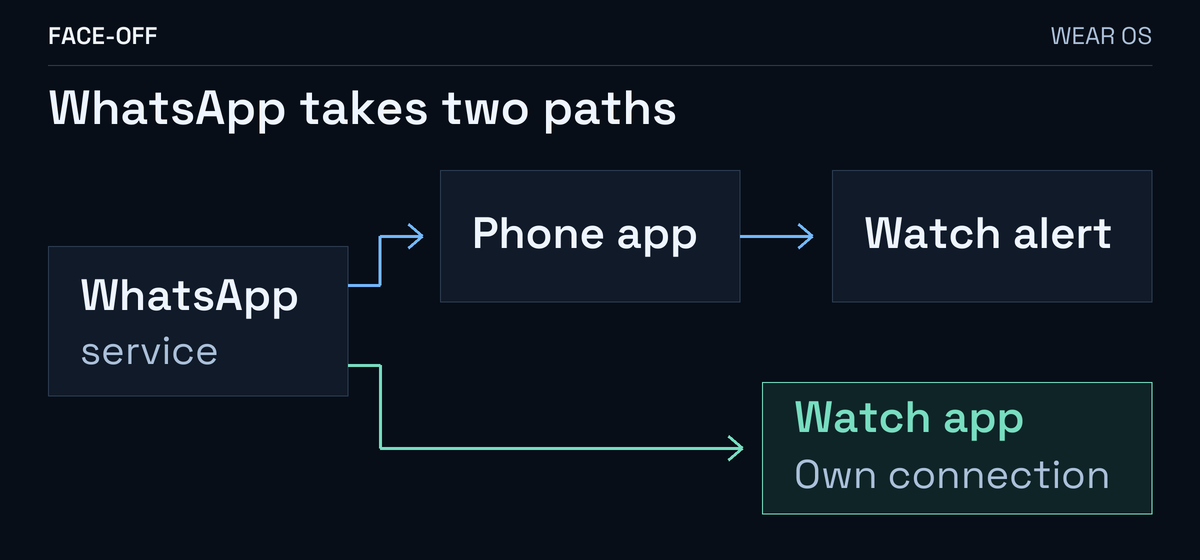
On a Wear OS Galaxy Watch, a WhatsApp card may be forwarded from the phone. Google’s Wear OS documentation explains how watch apps can create their own notifications and control forwarding.
Installing and linking WhatsApp on the watch adds another way to receive alerts.
Check the app and its link
Open WhatsApp from the watch’s app list. A linking prompt shows unfinished setup.
On your Android phone, review WhatsApp → More options → Linked devices for the watch.
A Watch 8 owner reported WhatsApp alerts on both devices during phone use despite their phone-notification preference. Check which app is involved before changing unrelated alert settings.
For phone alerts, use Galaxy Wearable
Open Galaxy Wearable → Watch settings → Notifications → App notifications, select All, and compare Phone apps with Watch apps. Samsung’s controls list them separately.
If you only want phone alerts, start with those controls. For a missing-card or phone-in-use comparison, use the Galaxy Watch notification guide.
To use the watch app, finish linking
Meta’s Wear OS setup supports Wear OS 3+ with a nearby Android phone using the same number. It excludes iPhone and WhatsApp Business.
- Install WhatsApp from the watch’s Play Store and open it.
- Unlock the phone and open its pairing prompt or notification.
- Enter the watch’s eight-character code on the phone, check it matches and confirm.
The installed watch app needs completed linking for its own alerts.
For broader iPhone pairing limits, see the iPhone and Wear OS guide.
When the phone is away
Meta’s linked-device guide says each device connects independently. The primary phone can be offline; the watch still needs internet. A watch cannot become the account’s primary device.
Keep using WhatsApp on the primary phone: 14 unused days can log linked devices out. Separately, Meta disconnects a linked device after 30 days of inactivity on that device.
Try an ordinary message with the watch connection you intend to use. Check receiving and replying separately.
Check calls separately: Meta lists answering and declining on watches paired with a phone running WhatsApp.


Discussion
0 comments. Share feedback or ask a question.
Sign in to comment.
No comments yet.