If you have an iPhone and a Galaxy Watch 4 or later, Samsung's app cannot set up the watch. Google also excludes iPhones from Pixel Watch support. Samsung acknowledges that third-party apps may provide limited connections, which it does not guarantee. Samsung's model guidance, Pixel Watch requirements.
For a watch you already own, keep the current setup while checking its model, installed software and the cost of another connection.
Pairing routes by model
Look for the exact model and software version in the watch's settings or the companion app you already use.
Galaxy Watch 4 and later Wear OS models
Samsung's iPhone app cannot set it up. Check a bridge publisher's model and feature list. Samsung
Pixel Watch
Google does not officially support iPhone pairing; check the bridge publisher's support separately. Google
TAG Heuer Calibre E4
TAG documents pairing through E3/E4 TAG Heuer Connected. E4 does not need the Google Wear OS app. TAG's generation guide
Montblanc Summit 3
Montblanc documents iPhone pairing through the Montblanc Summit app. iPhone users cannot reply directly to messages from the watch. Montblanc's FAQ
Older Wear OS models
Match the generation and installed OS. Some use Wear OS by Google, whose current iPhone app requires iOS 15+. That app does not support Wear OS 3 watches. Google setup, current app
Original Galaxy Watch, Active, Active2 or Watch3
These run Tizen. Samsung documents a legacy iPhone app route. Read the Tizen store-closure guide before relying on recovery of old apps. Samsung
Check the App Store's current requirements too; an older phone minimum in a manual may no longer be enough to install the app. TAG's Calibre E5 uses TAG Heuer OS and has its own pairing instructions. TAG's generation guide.
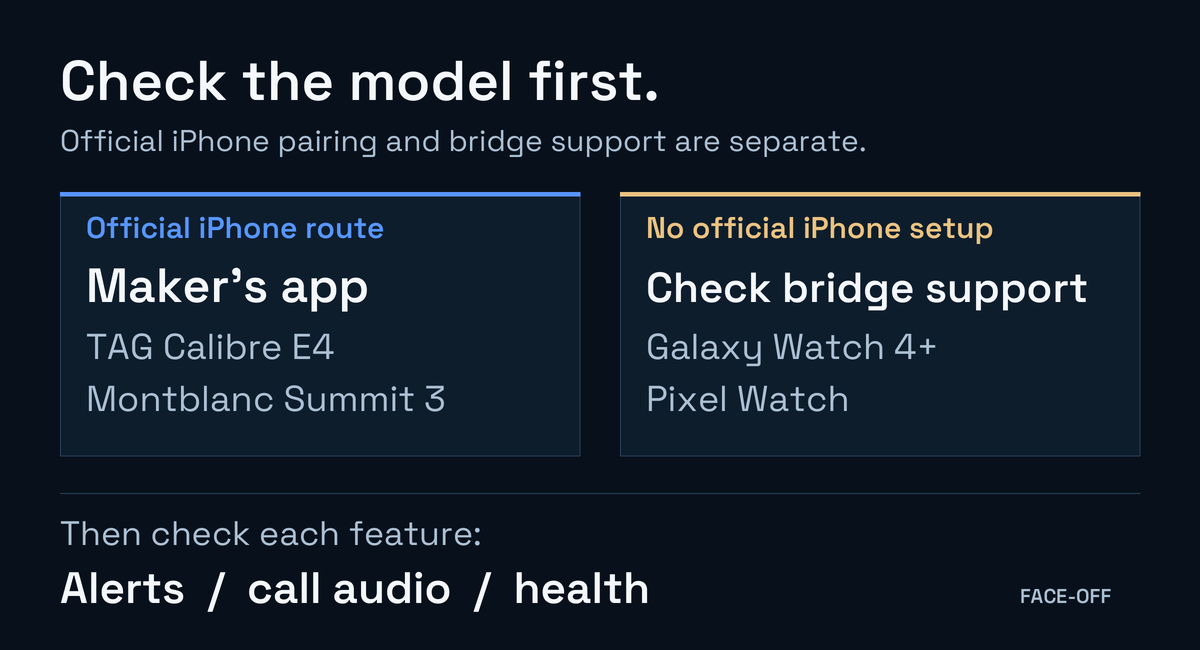
Find the route for your model, then check the features you need.
Bridge apps and costs
The features below are the publishers' claims. We have not tested these apps on a watch. US prices were checked on 16 November 2026; confirm the offer shown in your region before accepting a trial or purchase.
Lists notifications, health sync and media controls; requires iOS 17.2+. After a 14-day trial, paid plans include Basic at $3.99/month and Pro at $5.99/month, with annual options. Its policy covers analytics, identifiers and diagnostics as well as local content handling.
Bridge - Wear Sync (Orienlabs)
The publisher lists notifications, health sync and media controls on Wear OS 4+, excluding OnePlus/OPPO. Basic use is free with ads. Premium background health sync costs $0.99/month with ads or $1.99/month ad-free. The iOS description says 17.6+, but the information table says 17.0; ask the publisher if your phone falls between them. Its iOS privacy label declares tracking identifiers.
Costs $22.99 up front and runs on the watch without an iPhone companion app. Lists notifications, call alerts, images and contacts. Media controls remain planned. The publisher requires Android for initial watch setup. Play declares no data collection; read the linked policy before granting access.
Claims Wear OS 3+ support and requires iOS 17.6+. Lists calls, notifications and health sync. It advertises a seven-day trial and lists $2.99/week, $19.99/year and $39.99 lifetime offers. Its policy describes local personal-data handling alongside analytics, crash reporting and subscription services.
The store histories showed Merge 2.1.5, Bridge 1.1.9 and Lynio 1.2.0. SyncWear showed an update on 28 August 2026. Use these histories when comparing an old review with your installed version.
Do you need an Android phone first?
Tell the app publisher whether your watch already works or is waiting at its initial setup screen, along with the model and app version.
Merge's general guide requires Android activation. Its Watch 6 guide describes an iPhone installer. Ask which instructions apply before resetting your watch to try either path. The manufacturer iPhone routes above also have their own setup requirements.
What to try during a trial
Have someone send a message while your iPhone is locked. Read the preview, dismiss it, then check reply support separately. For calls, try answering and hanging up, and listen for where the audio actually plays. Merge's compatibility guide limits its call support to Samsung.
If health import matters to you, compare a workout or sleep period with the record written to Apple Health. For sleep, look for stage records if you need them, as well as total duration.
Wear the watch through a normal day to compare battery use. Leave Bluetooth range and return to see whether it reconnects without reopening apps. Decide before the trial renews whether the functions you use justify its cost. Get separate confirmation of payment support or an LTE plan using your iPhone number if you need those too.
About Apple's EU notification forwarding
Bluetooth notification access through ANCS and the newer Accessory Notifications framework are separate systems. Watch setup still follows the appropriate companion route.
Apple documents the newer framework from iOS 26.5. Customer use requires an iPhone located in the EU and an Apple Account with an EU country or region, and software support in the companion app and accessory. Supported implementations can carry text responses. Check the app's implementation before expecting a forwarding switch to enable your watch. We have not verified adoption by the apps above. Apple's requirements, response support.


Discussion
0 comments. Share feedback or ask a question.
Sign in to comment.
No comments yet.