A downloaded GWD can fail before the watch is involved. The project may still be inside a ZIP, the editor may be looking for a different project type, or the file may require a newer version of Galaxy Watch Studio. Find the failing step before downloading another editor or changing the file.
This checklist covers opening the editable project on a computer. If you already see the design and need to install it, continue with the Tizen installation guide or the GWD-to-Wear OS walkthrough.
Start with the creator’s source download
On Face-Off, the main installation download and the editable project can have separate actions. To open the source card in the DW Classic St Mawes example, follow these steps.
- Select Choose a download, choose Samsung (Tizen), then continue to the file step.
- Expand Show creator source files.
- Use Download GWD on the creator-source card when you want the editable project. The main Download button belongs to the selected TPK installation method in this example.
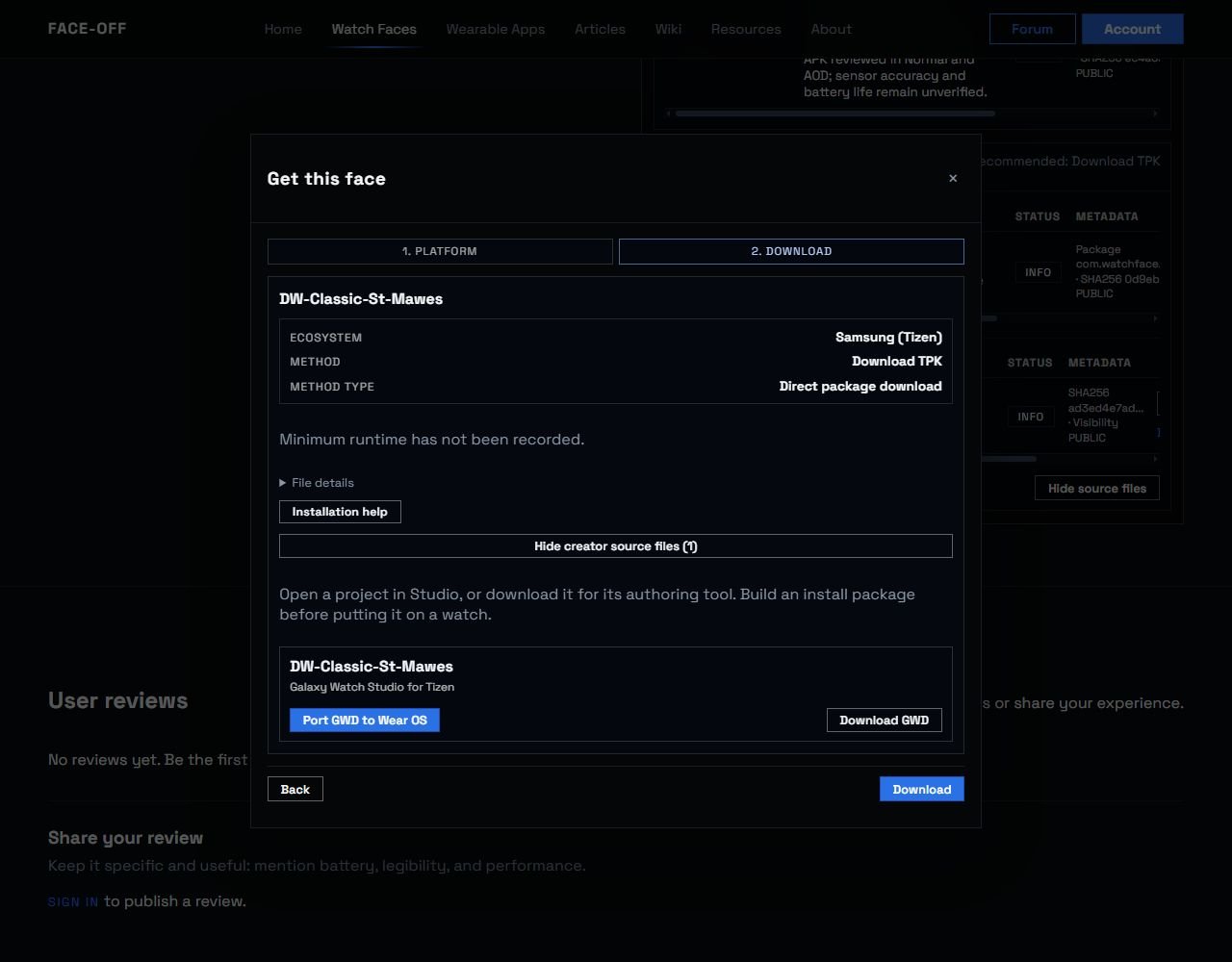
DW Classic’s GWD project has a separate action from its selected TPK package. Actual Face-Off website capture, 7 November 2026 UTC. Available source files vary by listing.
Keep the source as downloaded and read the creator’s notes before changing anything.
1. Check the complete filename
In Windows 11, open File Explorer and choose View → Show → File name extensions. Inspect the complete filename in the download folder. Microsoft describes this setting in its file-extension guide.
| You have | What to check | Next step |
|---|---|---|
dial.gwd |
The name identifies a GWD candidate. | Check the creator’s source notes and choose the appropriate editor route. |
dial-source.zip or dial.gwd.zip |
Inspect its contents and the creator’s instructions. | Extract only a confirmed outer bundle containing the project. |
dial.tpk |
This is a Tizen installation package. | Ask for the editable GWD if you want to edit or port the design. |
| Only PNG/JPG pictures | These may be previews or artwork. | Check the other folders and the creator’s download description. |
If you are unsure which download you selected, the file-format guide explains the source and installer choices.
2. Confirm whether the ZIP wraps another project
Keep the downloaded file unchanged. Read the creator’s instructions and inspect the ZIP’s contents before deciding to extract it. A .zip ending alone leaves the archive’s purpose unresolved. If the creator identifies the download as the project itself, follow that opening route and preserve the supplied file.
When the ZIP contains an actual project member, such as Sources/dial.gwd, alongside notes or previews, it is an outer bundle in this example. Right-click that ZIP, choose Extract All, and select a new folder. Microsoft’s ZIP extraction instructions.
Open the extracted folder and read any supplied notes. The project might be below a folder named Source or inside a folder for a particular variant. Keep the folder structure and companion files together until you know what the creator supplied.
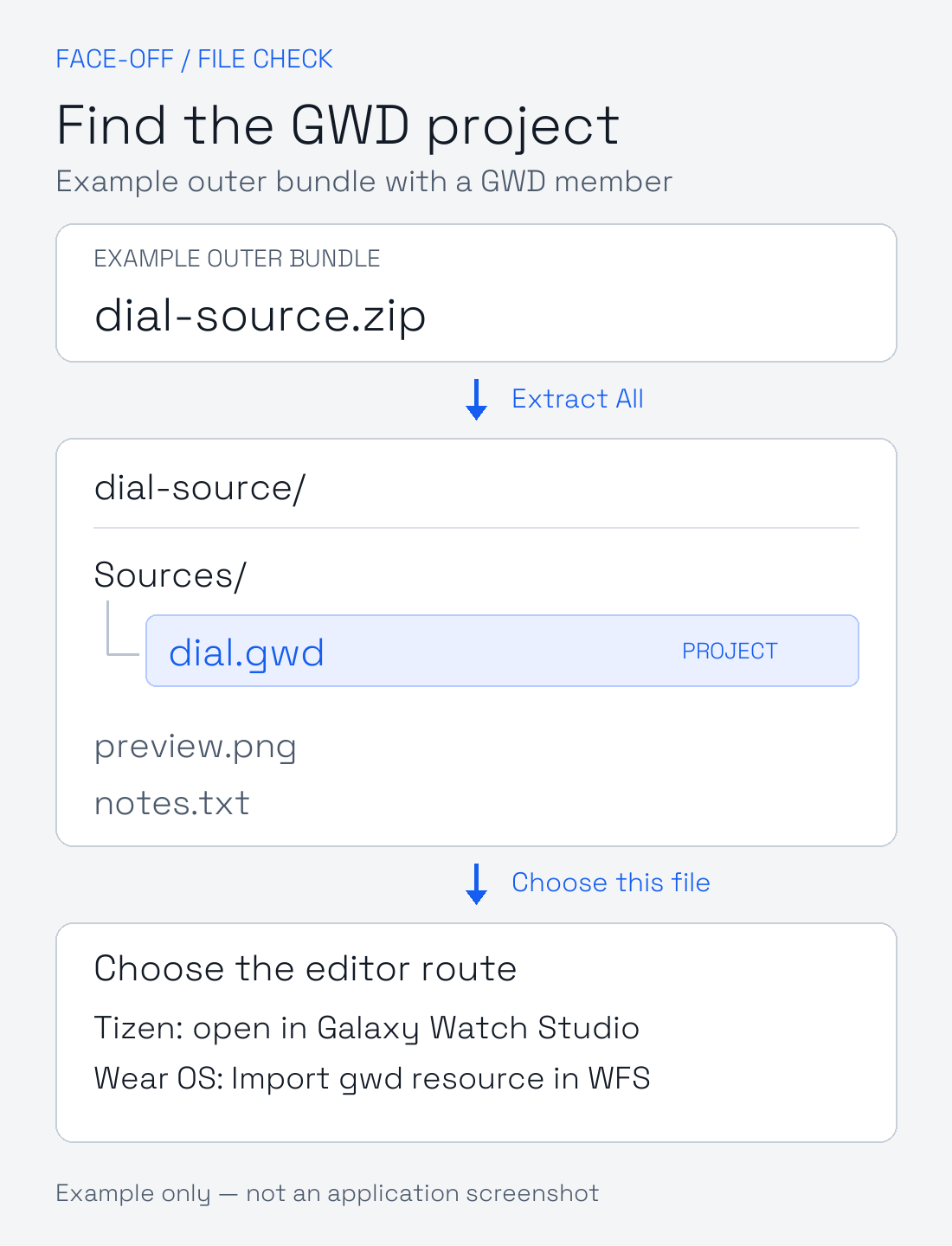
Example of an outer ZIP containing an actual GWD member. Original diagram with illustrative filenames. Check your archive’s contents and the creator’s notes first.
If there are several GWD files, compare their filenames and notes to identify the intended variant. Make a separate working copy of the project you choose.
If you find XML, resource folders or pictures without a separate project member, ask the creator how to open the supplied file. Keep the original. Do not rename or repack those contents to manufacture a GWD.
If extraction of a confirmed outer bundle reports an error, stop at that stage. Download the archive again from its original page and compare its recorded size or checksum when one is supplied. Report an archive that still cannot be extracted to its creator.
3. Use the route for your editor
Samsung’s similarly named editors have different jobs.
| Editor | Opening a GWD | What happens next |
|---|---|---|
| Galaxy Watch Studio for Tizen | Use its project-opening command for the original GWD. | Review the original Tizen design. |
| Watch Face Studio for Wear OS | Use Import gwd resource from the File menu. | Review and save the imported design as a separate project. |
| Face-Off Studio | Use its supported GWD import workflow. | Read the conversion findings and retain a separate Face-Off master. |
In Watch Face Studio, Open Project opens an existing WFS project. GWD uses a separate import operation. If the picker is showing a different project type, cancel it and choose GWD import. Samsung’s project guide.
Also check what kind of project you created. Samsung’s ClockFace plugin designs phone cover screens. GWD-resource import is unavailable for ClockFace projects. Start a watch-face project when you want to port a watch face. Samsung’s plugin guide.
4. Read the failure before trying another copy
Newer GWD in an older Galaxy Watch Studio
Newer GWS projects cannot be opened by older GWS versions. Record the full editor version and ask which version created the file. Keep a backup before opening the project in a different editor version. Samsung’s compatibility guide.
Encrypted GWD in Watch Face Studio
Samsung states that encrypted GWD projects cannot be imported through that route. Ask the creator for an editable, unencrypted source they can share. Samsung’s GWD import instructions.
Project opens with altered lettering or artwork
Samsung warns that some GWD components and settings may not transfer across operating systems. Keep the original reference and conversion findings, then use the porting walkthrough to compare fonts, pivots, calendar behavior and AOD. Preserve the original lettering while resolving an unavailable typeface.
Editor fails to start
Record the editor name, version, computer OS and startup message. Resolve that startup step before diagnosing the project’s opening behavior.
5. Send the details that identify the failed step
Keep these with the original download.
- The listing URL, exact downloaded filename and whether it was an outer archive.
- The extracted GWD filename and the selected variant, if several were supplied.
- The editor’s full name and version, plus your computer OS.
- The command you selected and the complete error message.
If extraction works but import fails, record both stages explicitly. “The ZIP extracts successfully. Sources/dial.gwd is present. Watch Face Studio rejects it after Import gwd resource.”
Once the project opens, save the working copy separately and check the design before building.
Discussion
0 comments. Share feedback or ask a question.
Sign in to comment.
No comments yet.