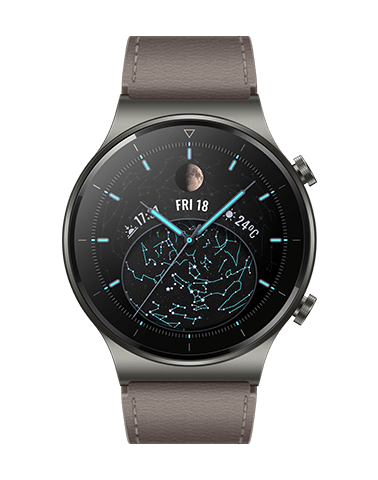
The Huawei Watch GT 2 Pro has a titanium frame, sapphire display cover and ceramic back. Huawei lists Sport Edition in Night Black and Classic Edition in Nebula Gray. Both use the same 1.39-inch, 454 × 454 AMOLED display. The Pro is a separate model from the standard Watch GT 2.
Find HWT downloads in Face-Off’s Huawei watch face library. Check the listed model before downloading: GT 2 Pro and the standard GT 2 use different package families.
Case and display
| Part | Specification |
|---|---|
| Case | 46.7 × 46.7 × 11.4 mm |
| Weight | Approximately 52 g without the strap |
| Display | 1.39-inch AMOLED; 454 × 454 pixels |
| Storage | 4 GB nominal; system software uses part of this space |
| Connection | Bluetooth 5.1; built-in GPS |
Phone and Huawei Health
Use Huawei Health to pair and manage the watch. Huawei's app-download guidance currently lists Android 8.0, iOS 13.0 or EMUI 12.0 and later. The older GT 2 Pro specification lists iOS 9. Check the current app requirement before buying this watch for an older iPhone.
Choose a face or use a photo
Touch and hold the watch's home screen, swipe through the installed faces and tap one to apply it. Huawei also lists Settings → Display → Watch face for the GT 2 series. In Huawei Health, open the watch's device details, then Watch faces → More. Tap Install for a new store design, or Set as default for an installed face. See Huawei's face-management instructions. Store availability varies by region; check which options your paired app shows before choosing a paid face.
To use your own photo, open Gallery under Watch faces → More → Mine → On watch. Some app versions use My faces → Manage local watch faces → Gallery. Tap +, choose Take photo or Select image, and crop the picture. Adjust the available colour, style and time-position options, then tap Set as default. Huawei's Gallery instructions show both menu routes.
Check an HWT's exact model
Choose a file explicitly made for GT 2 Pro. Huawei's distribution rules list 2.8.z packages for Pro and 2.5.z, 2.6.z or 2.7.z for the standard 46 mm GT 2. These are watch-face package versions, not installed firmware versions. A matching 454 × 454 resolution alone does not establish compatibility. The Huawei and Honor HWT installation guide covers the Android setup and transfer requirements for a file made for your model.
Battery estimate
Huawei's 14-day estimate uses a stated mixed-use scenario, including heart-rate and sleep monitoring, 90 minutes of GPS exercise per week and 200 screen activations per day. It is a manufacturer estimate; face settings and use affect endurance.
 A36 AMF
 A36 GAWsto
 A36 Big Weather
Comments
Discussion
0 comments. Share feedback or ask a question.
Sign in to comment.
No comments yet.